What Actually Happens When We Press Play?
Video Streaming System Design Case study
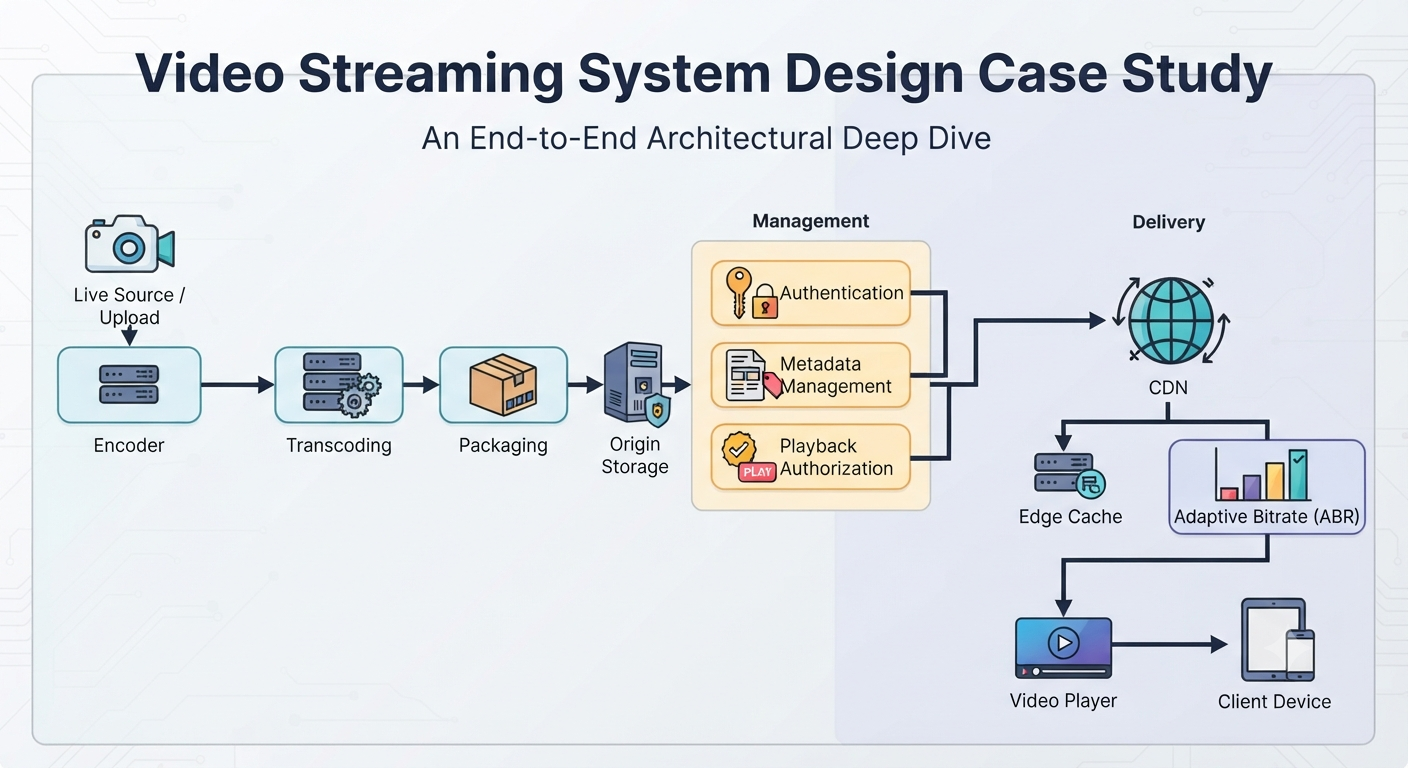
Recently, my company started working on something related to video streaming. That got me curious about what actually happens behind the scenes when we press the Play button on a streaming platform.
We watch videos every day. YouTube, Instagram Reels, live cricket, movies, online courses. But we rarely think about the engineering behind delivering a video smoothly, especially when millions of people are watching the same content.
I started with a simple question: If a video is just a file stored somewhere, why can't we simply send that file to the user?
Turns out, there is a lot more to it than I initially thought.
Why sending the entire video doesn't work
A video is essentially a sequence of frames displayed continuously, along with audio. These frames are encoded and compressed into a video file.
The problem is that videos can be huge. A high-quality movie can easily occupy several gigabytes.
If a server sends the entire video to the client and the client waits for the download to finish before playing it, the experience would be terrible. Nobody wants to wait several minutes before watching the first frame.
We could start playing the video while it is downloading, but that still introduces another problem.
Imagine I'm watching a video on my mobile network. My internet speed is 10 Mbps initially, but a few seconds later it drops to 2 Mbps.
If the video is consuming data faster than my network can deliver it, the player will eventually run out of downloaded content and playback will stop.
This is where the idea of streaming becomes important.
Instead of downloading the entire video, we can divide it into smaller chunks and start playing as soon as we have enough data.
The client downloads a few chunks, starts playback, and continues requesting the next chunks in the background.
This reduces startup time, avoids downloading content the user may never watch, and makes seeking much more efficient.
But dividing the video into chunks solves only one part of the problem. We still need to deal with different network speeds, devices, and screen sizes.
What if the user's internet speed keeps changing?
Let's say we have a video available in 1080p, requiring roughly 5 Mbps to play smoothly.
For someone with a stable 20 Mbps connection, that's probably fine.
But what about someone whose connection fluctuates between 2 Mbps and 6 Mbps? The video might work initially and then start buffering when the network slows down.
We could provide a lower-quality video to everyone, but that would unnecessarily degrade the experience for users with good internet connections.
Instead, streaming platforms prepare multiple versions of the same video.
The same video might be available in 240p, 360p, 480p, 720p, 1080p, and even 4K, with different bitrates for each version.
This is called an encoding ladder.
The player doesn't have to stick to one quality throughout playback. It can choose a quality based on the available bandwidth and switch when network conditions change.
This is known as Adaptive Bitrate Streaming (ABR).
For example, if the player estimates that the network can comfortably support 1080p, it can download those segments. If the network suddenly becomes slower, it can switch to 480p before the buffer runs out.
When the connection improves, it can move back to a higher quality.
This is why you sometimes notice video quality changing automatically without the playback stopping.
The player is continuously making decisions based on network speed, buffer availability, and the available renditions.
The goal isn't to always play the highest quality. It's to provide the best quality that the current network can sustain without interrupting playback.
How does the player know what to download?
Now we have multiple versions of a video, each divided into segments.
But the player needs to know which qualities are available, where those segments are located, and how to request them.
We need something that describes the structure of the video.
This is where manifests come in.
A manifest contains information about the available video renditions and the media segments that make up the video.
Two widely used formats are HLS (HTTP Live Streaming) and MPEG-DASH.
HLS uses .m3u8 playlists, while DASH uses an XML-based manifest called an MPD.
A simplified HLS master playlist could look like this:
#EXTM3U

#EXT-X-STREAM-INF:BANDWIDTH=800000,RESOLUTION=640x360
360p/playlist.m3u8

#EXT-X-STREAM-INF:BANDWIDTH=2500000,RESOLUTION=1280x720
720p/playlist.m3u8

#EXT-X-STREAM-INF:BANDWIDTH=5000000,RESOLUTION=1920x1080
1080p/playlist.m3u8
This tells the player which renditions are available.
The player can then fetch the playlist for a particular rendition, which contains the references to individual segments.
For example:
#EXTM3U

#EXTINF:4.0,
segment001.ts

#EXTINF:4.0,
segment002.ts

#EXTINF:4.0,
segment003.ts

#EXTINF:4.0,
segment004.ts
Each segment represents a small portion of the video.
The player downloads these segments, decodes them, and plays them in order. When network conditions change, it can request the next segment from another rendition instead.
HLS and DASH solve a similar problem, but their implementations, device support, DRM ecosystem, and delivery requirements can influence which one a platform chooses.
The important thing is that the client is no longer downloading one huge file. It has a structured way of requesting exactly the media it needs.
But where do all these video versions come from?
So far, we've been talking about the playback side.
But before a video can be streamed this way, somebody has to prepare all these renditions, generate the segments, and make the content available for delivery.
This is where the architecture starts becoming more interesting.
I think one of the most useful ways to understand a video streaming system is to separate it into two workloads:
- The processing pipeline, which prepares videos before playback.
- The delivery pipeline, which serves videos to viewers.
These two workloads have very different scaling requirements.
Processing is compute-heavy and asynchronous. Delivery is bandwidth-heavy and latency-sensitive.
The video processing pipeline
Let's say a creator uploads a video to our platform.
We don't want our API server to hold the request open while it processes a multi-gigabyte file. We also don't want to tie video processing to the lifecycle of an API request.
A more practical approach is to upload the original video to object storage and process it asynchronously.
For large videos, the upload itself could use multipart or resumable uploads, so a network failure doesn't necessarily force the user to start from scratch.
Once the upload is complete, we can trigger a processing job.
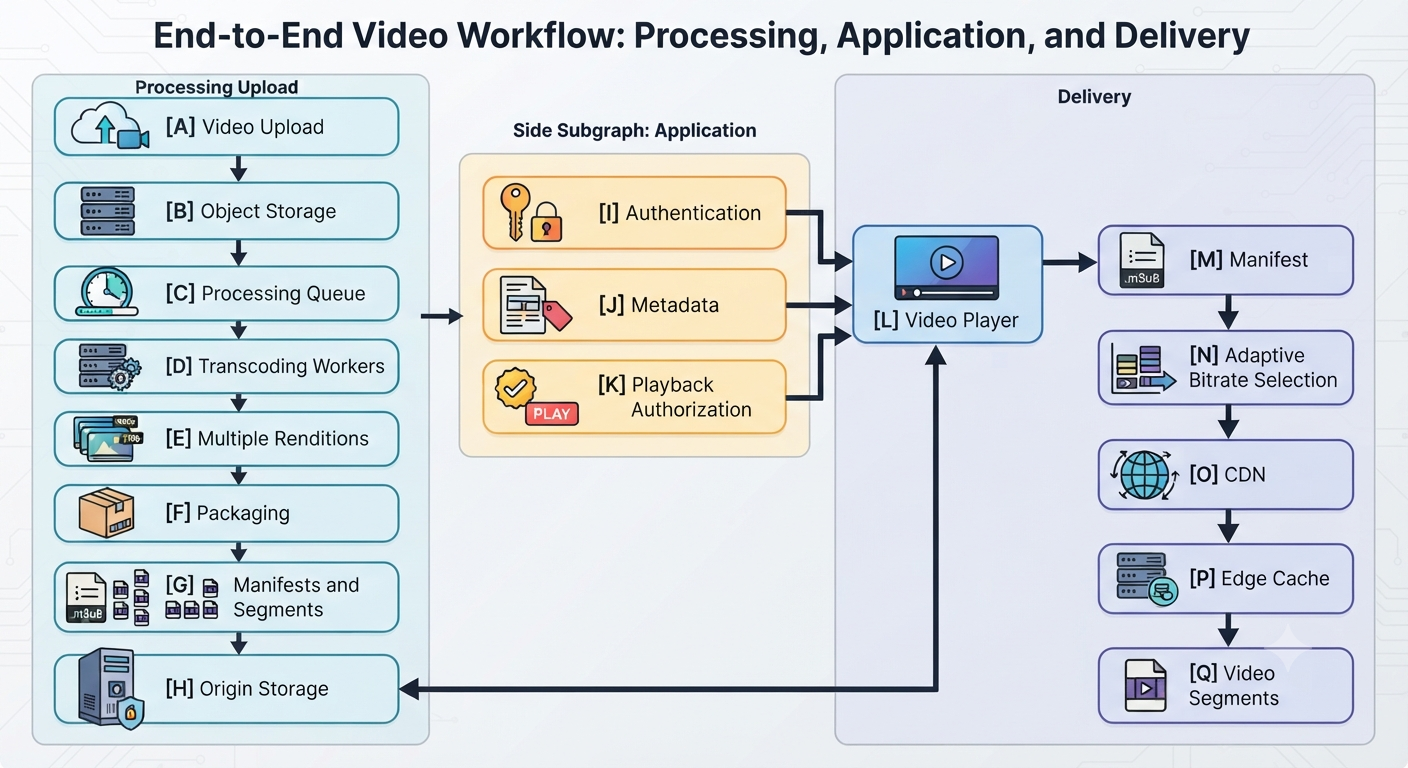
A simplified pipeline would look something like this:
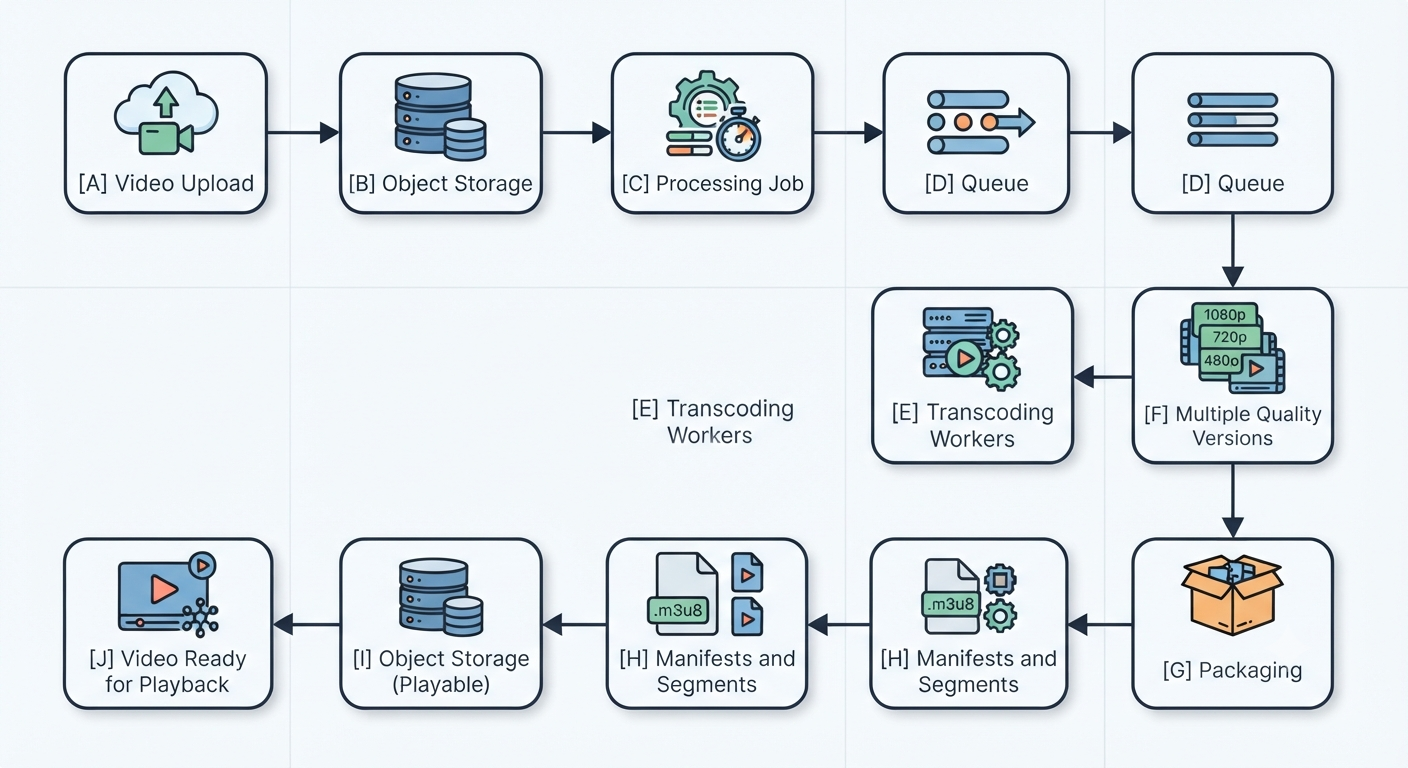
The backend handles the upload, stores metadata, and creates a processing job.
That job goes into a queue, where workers pick it up when they have capacity.
The workers can perform several operations:
- Validate the uploaded video
- Extract duration, resolution, frame rate, and other metadata
- Encode the video into multiple resolutions and bitrates
- Generate thumbnails
- Prepare subtitles
- Apply content moderation
- Package the video into a streaming format
Once the processing is complete, the system marks the video as ready for playback.
The reason for using a queue here is that video processing can take a considerable amount of time and resources. We can scale the workers independently from our API servers and absorb sudden bursts of uploads without making our application unresponsive.
For example, if thousands of creators upload videos at the same time, the queue can hold those jobs while processing workers gradually consume them.
We don't need to spin up a worker for every upload immediately. We can scale processing capacity based on queue depth, processing time, priorities, and available resources.
Also, encoding, transcoding, and packaging aren't exactly the same thing.
Encoding compresses the video using a codec. Transcoding generally involves converting media into other encodings or formats, such as generating different resolutions and bitrates. Packaging organizes the encoded media into a delivery format such as HLS or DASH, along with its manifests and segments.
Keeping these operations separate makes it easier to understand where compute resources are required and where the media is simply being prepared for delivery.
Why the CDN becomes one of the most important parts
Now imagine the video has been processed and is ready to play.
If every user downloads the video segments directly from our backend or central storage, the infrastructure will have to handle a huge amount of repeated traffic.
Let's say a video suddenly becomes popular and a million people start watching it.
The same segments might be requested thousands of times, over and over again, from users distributed across different locations.
This is where a Content Delivery Network (CDN) becomes extremely important.
A CDN has servers distributed across geographical locations. Instead of fetching content from a central origin every time, users can fetch it from a nearby edge server.
The architecture now looks more like this:
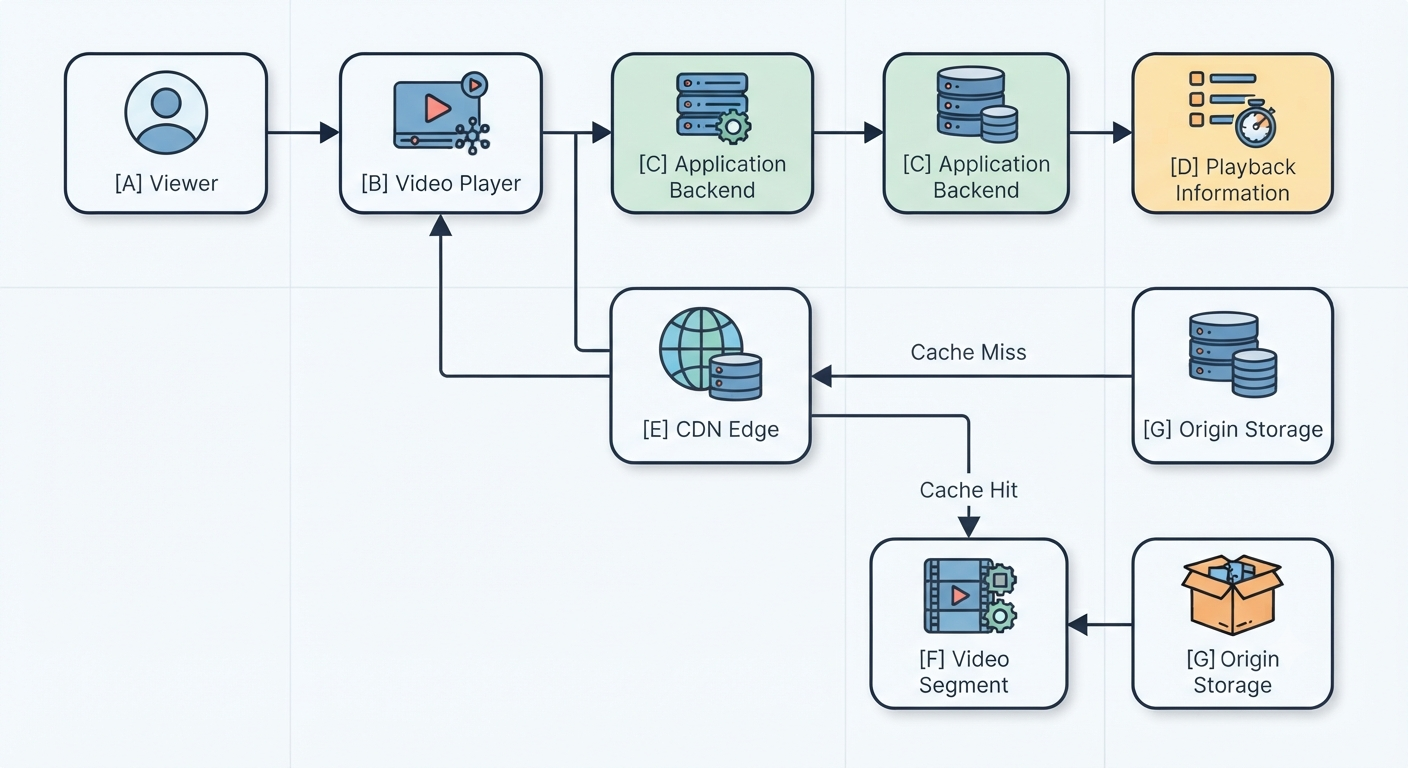
The application backend is still responsible for authentication, video metadata, playback authorization, viewing history, and other application-level functionality.
But the actual video segments don't need to pass through our application servers.
The CDN can serve them directly.
If a segment is already cached at the edge, the CDN serves it immediately.
If it's not available, the CDN fetches it from the origin, caches it, and serves the viewer.
The next user requesting the same segment may get it directly from the cache.
This is particularly effective for VOD because video segments are generally immutable once published. The same content can be served to thousands of users without repeatedly fetching it from the origin.
This is one of the reasons video streaming platforms can handle massive traffic without sending every request to their application backend.
But caching itself has its own challenges.
If a popular segment isn't cached and suddenly thousands of users request it, we could still overwhelm the origin with repeated requests.
Techniques such as request collapsing, origin shielding, cache warming, and carefully designed cache expiration policies help reduce this problem.
The manifest also needs a different caching strategy from the media segments, especially for live streaming, where the manifest is constantly changing.
What happens when millions of users press Play at the same time?
This is where things start getting interesting from a system design perspective.
Imagine a major cricket match is about to start.
Millions of users have already opened the application. The match begins, and everyone presses Play within a few seconds.
The traffic is not gradually increasing. It is arriving in a massive burst.
The video delivery layer might be protected by the CDN, but our application backend still has to handle requests for authentication, playback information, metadata, live scores, advertisements, and other functionality.
And simply adding more backend instances doesn't solve every problem.
Our database could become overloaded. Redis could become a bottleneck. A third-party service might start timing out. The CDN might experience cache misses. A downstream dependency could fail.
Scaling one service doesn't necessarily scale the entire system.
This is why capacity planning and load testing become important, especially before a major live event.
We need to understand what happens when traffic reaches several times the normal load, how quickly our infrastructure can scale, and whether any dependency becomes the bottleneck before the rest of the system does.
We also need to look at how users actually behave.
For example, during a live event, users may open the application before the match starts, repeatedly refresh the page, switch between streams, or all request the same content around the same moment.
Understanding these patterns can be just as important as knowing the theoretical capacity of our servers.
Live streaming is a different problem
Until now, most of the architecture we've discussed has been for Video on Demand (VOD).
VOD is relatively straightforward because the video already exists. We can upload it, process it, encode it, package it, and store it before users start watching.
Live streaming changes that completely.
The content is being generated continuously, and the system has to process and deliver it while the event is happening.
A simplified live streaming pipeline might look like this:
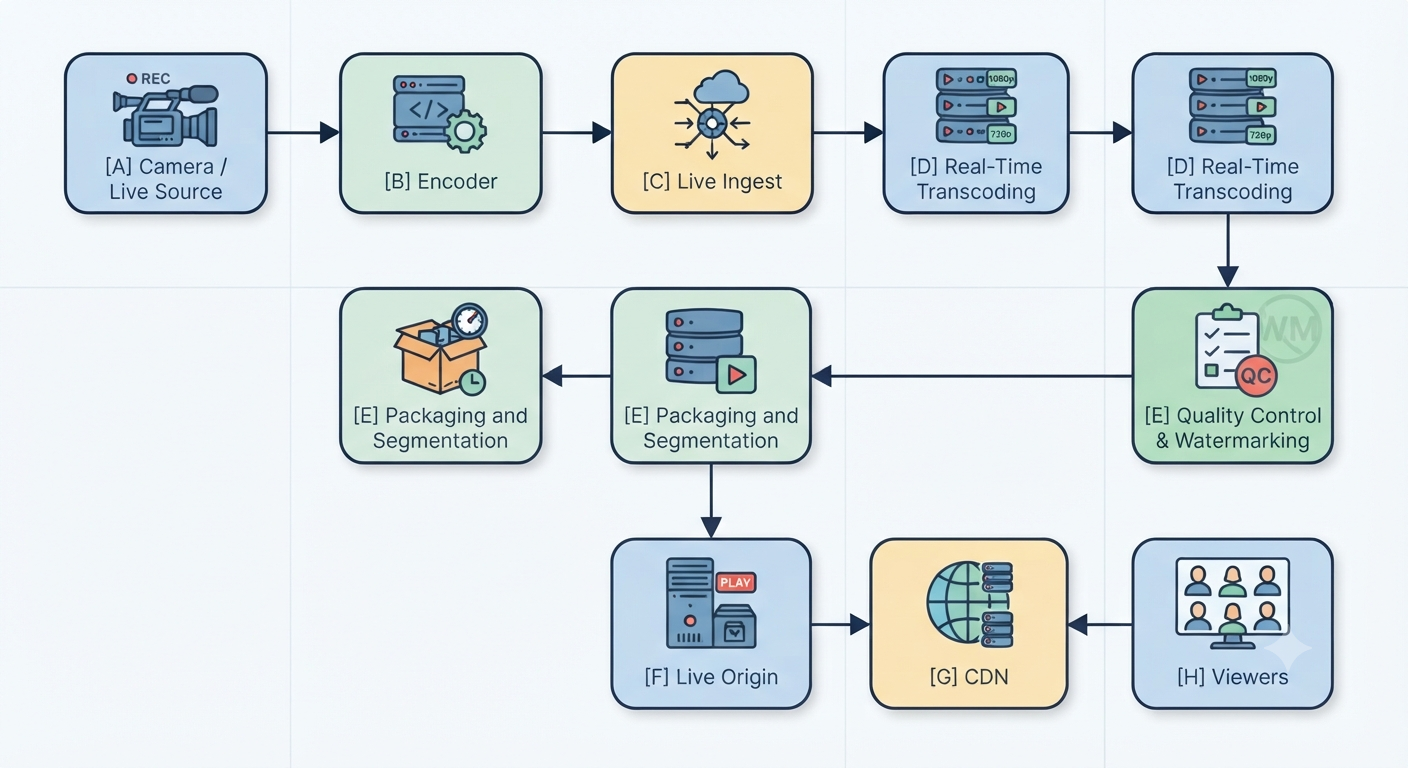
The camera or broadcast source sends a stream to the ingest layer.
The ingest system receives it and forwards it to the processing pipeline.
The stream is transcoded into different quality levels, packaged into segments, and made available through a continuously updated manifest.
The CDN distributes these segments to viewers.
Unlike VOD, where all segments are already available, live segments are continuously being generated. The player periodically refreshes the manifest to discover new segments and continue playback.
This introduces another important problem: latency.
Why live streaming latency matters
Imagine watching a cricket match on your phone while your friend is watching it on television.
Your friend celebrates a wicket before you even see the ball.
Your stream is behind the actual event.
Latency can accumulate at multiple stages:
- Encoding
- Ingest
- Transcoding
- Segment generation
- Manifest updates
- CDN delivery
- Player buffering
Traditional HLS and DASH often prioritize reliability and scalability over ultra-low latency, which can introduce noticeable delays.
For scenarios where latency matters more, Low-Latency HLS (LL-HLS) and Low-Latency DASH can reduce the delay while retaining HTTP-based delivery.
For interactive communication requiring extremely low latency, WebRTC might be a better choice.
But there is no universally best protocol.
HLS and DASH work well with CDN-based delivery and large audiences. WebRTC is designed for real-time communication and has different infrastructure and scaling characteristics.
A recorded lecture, a live cricket match, a video call, and an interactive live stream have different requirements. The protocol and architecture depend on what the product is trying to achieve.
The video is important, but everything around it matters too
While exploring streaming architecture, I realized that delivering video is only part of the user experience.
A streaming application might also have live chat, comments, recommendations, viewer counts, advertisements, analytics, live scores, and personalized content.
But these features don't all have the same importance.
If the viewer count API fails, we probably shouldn't stop the video.
If recommendations aren't loading, we can show cached content or simply skip them.
If analytics events are delayed, playback should continue.
This is where graceful degradation becomes important.
We need to identify the critical path of the user experience and make sure optional functionality doesn't become a dependency for it.
For a streaming application, the critical path generally includes getting valid playback information, fetching the manifest, downloading segments, and actually playing the video.
Other functionality can often fail independently.
| Component | Possible fallback |
|---|---|
| Viewer count | Hide it or show a stale value |
| Recommendations | Show cached or default content |
| Analytics | Buffer events or drop non-critical events |
| Live chat | Temporarily disable chat |
| Thumbnails | Show a fallback image |
| Video playback | Prioritize recovery because it is the core experience |
The exact fallback depends on the product, but the principle is the same: a failure in one feature shouldn't unnecessarily affect everything else.
Preparing for failures before they happen
At scale, failures are inevitable.
A CDN could have problems in one region. A database could become slow. A downstream API could time out. A queue could start growing faster than workers can process it.
The question isn't whether failures will happen. It's how much of the system they affect.
For a live event, this becomes even more important because we don't get another chance to deliver the event in real time.
Teams can simulate failures before the event by killing instances, introducing latency, testing CDN origin failures, increasing traffic beyond expected capacity, and observing how the system responds.
These exercises help identify bottlenecks that aren't visible during normal traffic.
Even retry logic needs to be designed carefully.
If a request fails, the client may retry it. But if thousands of clients retry at the same time, they can create even more traffic and make the original problem worse.
Retries should generally be bounded, use exponential backoff and jitter, and stop when continuing to retry is no longer useful.
Circuit breakers and other failure-control mechanisms can help prevent requests from repeatedly overwhelming an already unhealthy dependency.
The goal is to recover from temporary failures without turning them into larger outages.
Sometimes the best solution is to turn a feature off
Another thing I found interesting was the idea of preparing emergency controls for high-traffic events.
Imagine a live match is running, and our recommendation service starts causing latency across the application.
We might not need recommendations at that moment.
If we have feature flags, we can disable them without deploying new code.
The same approach can be used for other non-essential functionality, such as expensive analytics, heavy UI features, certain personalization calls, or live chat.
This gives the engineering team a way to protect the core experience when the system is under pressure.
Instead of trying to keep every feature working during an incident, we can temporarily sacrifice some functionality to keep playback working.
How do we know users are actually having a good experience?
One thing that stood out to me is that backend health doesn't necessarily mean the user is having a good experience.
Our API might return HTTP 200.
Our servers might have low CPU usage.
Our database might be healthy.
But the user could still be waiting 20 seconds for the video to start, experiencing frequent buffering, or watching at a much lower quality than expected.
So monitoring a streaming platform needs to go beyond traditional backend metrics.
We still need request latency, error rates, CPU, memory, database latency, queue depth, and worker utilization.
But we also need to monitor the playback experience.
| Metric | Why it matters |
|---|---|
| Playback start time | How long the user waits before the video starts |
| Rebuffering ratio | How much time is lost to buffering during playback |
| Playback failure rate | How often users fail to start or continue watching |
| Average bitrate | The quality at which users are watching |
| Quality switches | How frequently the player changes resolution |
| CDN cache hit ratio | How effectively content is served from the edge |
| Segment download time | Whether video segments are arriving quickly enough |
| Live latency | How far the viewer is behind the actual live event |
These metrics help us understand whether the system is actually delivering a good experience.
For example, if playback failures suddenly increase only for users in a particular region, the problem might not be our application backend at all.
It could be DNS resolution, ISP routing, CDN connectivity, or some other issue outside our application servers.
Monitoring the complete journey from clicking Play to actually rendering the video is much more useful than looking at backend health in isolation.
Putting it all together
After exploring the different pieces, video streaming started making much more sense to me.
What initially looked like a simple file delivery problem turned out to be several systems working together.
The processing pipeline prepares the video before playback.
The encoding system creates multiple quality levels.
The packaging system generates manifests and segments.
Object storage holds the media.
The CDN distributes it close to users.
The player continuously decides what to download next based on network conditions and buffer availability.
And the backend handles the application functionality around playback.
The exact implementation can vary. Some components may be managed services, some may be internal systems, and some may not even exist at a smaller scale.
But the separation of responsibilities is what makes the architecture easier to reason about.
We don't want video processing to block our APIs.
We don't want every viewer to reach our origin.
We don't want a slow recommendation service to stop playback.
We don't want one failure to bring down the entire experience.
And we don't want to provide a single video quality and expect it to work for every device and network.
Each component exists because it solves a particular problem.
What I took away from this
The most interesting part of studying video streaming wasn't HLS, DASH, transcoding, or CDN individually.
It was understanding how all these pieces work together.
A video can be perfectly encoded, but if the CDN isn't delivering segments efficiently, users will buffer.
A CDN can be healthy, but if the manifest is incorrect, playback can fail.
The backend can scale horizontally, but a database or downstream service can still become a bottleneck.
A player can support adaptive bitrate streaming, but if the available renditions aren't well prepared, users can still have a poor experience.
And an architecture that works perfectly during normal traffic might behave very differently when millions of users arrive within minutes.
That's what makes video streaming an interesting system design problem. There isn't one component that solves it. The experience depends on the entire pipeline working together, while still being able to tolerate failures in individual components.
I started this exploration thinking about how a video reaches a user.
I ended up learning much more about asynchronous processing, caching, distributed systems, capacity planning, fault tolerance, latency, and designing systems where the user experience matters more than whether every individual service is healthy.
A streaming system isn't successful just because it can deliver video.
It's successful when it can deliver the video reliably, at the right quality, to the right user, even when the network is unstable, traffic suddenly increases, or parts of the infrastructure fail.
And that's what makes the engineering behind something as simple as pressing Play interesting.
Comments
Join the discussionNo comments yet. Be the first to comment.